Professional Certificate in AI Productivity & No-Code Automation

Master AI Tools to Automate Work, Create Content & Boost Productivity

Duration: 30–40 Hours | Practical, Tool-Based Course | No Coding Required

Learn how to use today’s leading AI tools to work smarter, automate repetitive tasks, create professional content, analyze data, conduct research, and streamline everyday business operations—without writing a single line of code.

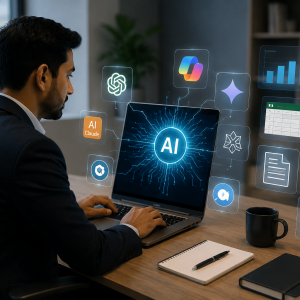
The Professional Certificate in AI Productivity & No-Code Automation is designed for business professionals who want to use Artificial Intelligence practically in their day-to-day work. The program provides hands-on exposure to popular AI tools including ChatGPT, Google Gemini, Microsoft Copilot, Claude, Perplexity, NotebookLM, Canva AI, Gamma, Zapier, Make.com and n8n.
Rather than focusing on programming or complex AI theory, this course focuses on how to apply AI immediately at work—from writing emails and preparing reports to analyzing Excel data, creating presentations, conducting research, generating marketing content and automating business workflows.

By the end of the program, you will be able to use AI tools confidently for daily work, automate repetitive office tasks, create professional documents and presentations, analyze data, develop marketing content, and build simple AI assistants without coding.

The program provides practical exposure to a broad range of AI productivity and automation platforms:

ChatGPT | Google Gemini | Microsoft Copilot | Claude | Perplexity AI | NotebookLM | Canva AI | Gamma AI | Grammarly AI | Notion AI | DALL·E | Midjourney | Adobe Firefly | CapCut AI | Zapier | Make.com | n8n | Google Workspace AI | Microsoft 365 Copilot


What You Will Learn

Through practical, tool-based learning, you will learn how to:

  • Use ChatGPT, Gemini, Copilot and Claude effectively
  • Write better prompts and build reusable prompt libraries
  • Use AI to write professional emails, proposals and business communications
  • Summarize, translate and analyze documents
  • Create business presentations, reports and brochures using AI
  • Use AI with Excel and Google Sheets for formulas, data cleaning and analysis
  • Create charts and dashboards with AI assistance
  • Automate meeting notes, action items and task planning
  • Conduct market research and competitor analysis using AI
  • Analyze PDFs and build organized knowledge resources
  • Create images, posters, marketing creatives and videos using AI
  • Generate SEO content, blogs and social media posts
  • Build automated business workflows without programming
  • Connect different applications using no-code automation platforms
  • Build personalized AI assistants for HR, Sales, Marketing, Finance and other business functions
  • Apply AI to everyday office activities and business processes

Program Curriculum

Module 01

Getting Started with AI Tools

Tools: ChatGPT, Google Gemini, Microsoft Copilot, Claude

Topics: Comparing AI tools, selecting the right tool, prompt engineering, reusable prompts, prompt library.

Module 02

AI for Writing & Business Communication

Tools: ChatGPT, Grammarly AI, Microsoft Copilot, Google Gemini

Topics: Emails, customers, proposals, summaries, translation, professional communication.

Module 03

AI for Documents & Presentations

Tools: Microsoft Copilot, Google Workspace AI, Gamma AI, Canva AI

Topics: Presentations, business reports, brochures, executive presentations, business presentations.

Module 04

AI for Data Analysis & Excel

Tools: Excel Copilot, ChatGPT, Google Sheets AI

Topics: Formulas, data cleaning, analysis, charts, dashboards.

Module 05

AI for Meetings & Workplace Productivity

Tools: Microsoft Teams Copilot, Google Meet AI, Notion AI

Topics: Meeting notes, action items, task planning, daily organization.

Module 06

AI for Research & Knowledge Management

Tools: Perplexity AI, ChatGPT, Google Gemini, NotebookLM

Topics: Market research, competitor analysis, PDF summarization, knowledge management.

Module 07

AI for Image & Video Creation

Tools: Canva AI, Adobe Firefly, DALL·E, Midjourney, CapCut AI

Topics: Posters, marketing creatives, AI videos, background removal.

Module 08

AI for Marketing & Content Creation

Tools: ChatGPT, Canva AI, Buffer AI, Gamma AI

Topics: Social posts, blogs, SEO, content calendars, ads.

Module 09

No-Code AI Automation

Tools: Zapier, Make.com, n8n

Topics: Automating emails, attachments, Sheets, reports, app connections, workflows.

Module 10

Building Your Personal AI Assistant

Tools: ChatGPT Projects, Custom GPTs, Gemini Gems, Microsoft Copilot Agents

Applications: HR, Sales, Marketing, Finance, Personal Productivity.

Module 11

AI for Daily Office Productivity

Topics: Email drafting, meeting summaries, invoice creation, resume creation, business reports, travel planning, project planning.

Module 12

Capstone Project

Project: Build an AI-Powered Business Productivity Workflow.

Combine multiple AI tools to automate a real business process and integrate AI into professional workflows.

Module 13

AI Tools Covered

ChatGPT, Google Gemini, Microsoft Copilot, Claude, Grammarly AI, Google Workspace AI, Gamma AI, Canva AI, Excel Copilot, Google Sheets AI, Teams Copilot, Google Meet AI, Notion AI, Perplexity AI, NotebookLM, Adobe Firefly, DALL·E, Midjourney, CapCut AI, Buffer AI, Zapier, Make.com, n8n and more.

Module 14

Who Should Take This Course?

Business Professionals, Managers and Team Leaders, HR, Sales, Marketing, Finance, Operations, Entrepreneurs, Business Owners, Project Managers, Administrative Professionals, Consultants, Students and Early-Career Professionals.

No programming experience required.

Module 15

Course Outcomes

Use AI tools confidently, automate repetitive office tasks, create documents, presentations and reports faster, analyze spreadsheets and data with AI, create marketing and communication content, build simple AI assistants without coding, connect apps and automate workflows, and save time while improving productivity.

Course Name

Duration

Srat Date

End Date

Time

Holidays

AI Productivity & Automation with AI Tools (No Coding Required)

one month

15-Sep-26

16-Oct-26

Wednesday, Thursday, Friday and Saturday 8 PM to 10 PM

2 Oct 2026 and All Sundays, Mondays, Tuesdays

AI Productivity & Automation with AI Tools (No Coding Required)

one month

19-Sep-26

17-Oct-26

Saturdays From 9AM 6PM with one hour break

Sunday to Friday Holiday

Reviews

There are no reviews yet.

Be the first to review “Professional Certificate in AI Productivity & No-Code Automation”

Your email address will not be published. Required fields are marked *

© 2026 VorteXPro Pvt. Ltd. All rights reserved.

CIN: U62099KA2026PTC221566

Scroll to Top